March 21, 2026
Contents
- Who are you
- Why read this
- What is emacs
- Pen Pineapple AppleScript
- Browsers… in the cloud!
- Key takeaways
Who are you
I’ve been writing on this personal blog for five years and, while I’ve never had a single post “make it” or go viral, I wanted to know how I could improve my writing. Rounds of sharing drafts among friends could certainly help with prose but surely there’s something else I could be doing better.
I’m assuming you’re either wondering how automating web browsers was helpful at all for writing a blog post or you’re wondering how emacs came up in web scraping. If you’d instead like to read about a more useful application of headless browsers running in the cloud, I have another post where I have agents QA an app to improve its UX.
Why read this
Candidly, I am deaf and wear cochlear implants to hear, effectively mimicking one of the five basic senses people could take for granted. I believe technology is the closest thing we have to magic. As the meme goes, if you were to describe cat videos on YouTube or agents posting on Molthub to the pilgrims landing in the Americas, they’d figure you were actually insane.
While originally stated for crypto,
There is $10,000,000 stuck inside of your laptop right now, you just need to figure out how to get it out
There is an inherit truth in how access to the world’s information and cloud compute meaningfully make a lot of tasks people would be interested in possible. So, whether that’s attaining enough money to retire your parents or accumulating datapoints on developer oriented blogs, I think code can help accomplish awesome things.
What is emacs

emacs, aka the holy editor, is just a highly configurable text editor. Rather than come out of the box with a lot of tooling for a certain language like an IDE, it starts out rather “vanilla” so whichever specific tools a developer wants can be included incrementally.
If you’re a web developer, you can install packages that give syntax highlighting for JSX or convenient lint and style hooks. If you’re a Clojure or Python developer, then there are packages that give elegant REPL environments from inside the editor you’re writing the very code you’re testing.
Unlike more extensible editors like VS Code, you won’t find many YC companies starting as forks of emacs. That lends to VS Code having more of an ecosystem around published editor extensions whereas you’ll find more people publishing their entire emacs configurations.
For years, it was a common joke that emacs was unusable since its lisp looks drastically different from the languages that actually pay to know them in industry. Now, thanks to coding agents, modifying your emacs to work the way you want to is a prompt away.
Pen Pineapple AppleScript
In order to identify how to write what would be the best blog post, I decided to break this down into three components:
- Getting the best blog post URLs from r/devblogs
- Spawning a bunch of headless browsers to get their content with readability.js
- Letting Claude summarize the articles that were successfully scraped and write what makes a good blog post.
For the first step, Reddit is notoriously difficult to scrape so I opted to control my local Chrome instance where I’m already logged in to fan through the top posts.
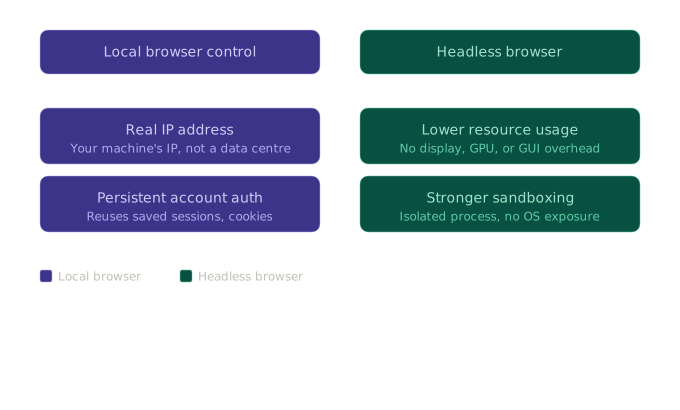
To get the content, I went with the backwards-compatible old.reddit.com domain as it renders in static HTML pages instead of a JavaScript SPA.

For programmatically controlling my Chrome browser where I’m signed in (instead of a temporary “testing” profile that tends to trip up bot detection), I use AppleScript, a scripting language which, quoting from their website:
It allows users to directly control scriptable Macintosh applications… You can create scripts—sets of written instructions—to automate repetitive tasks
Fed through the osascript CLI, I can simply “tell” Chrome to navigate to a given link:
tell application "Google Chrome"
  activate
  set URL of active tab of front window to "https://yev.bar"
end tell
For something you can paste into your terminal to watch it in action (requires you run it on a Mac):
$ osascript -e 'tell application "Google Chrome"
  activate
  set URL of active tab of front window to "https://yev.bar"
end tell'
After putting the AppleScript commands behind an interactive elisp method, I can invoke them through M-x (the emacs version of a quick switcher menu). Shown below is a screen recording of me running M-x scrape-devblogs to control my Chrome instance where I’m already signed in to navigate to the page for viewing top posts in the subreddit.
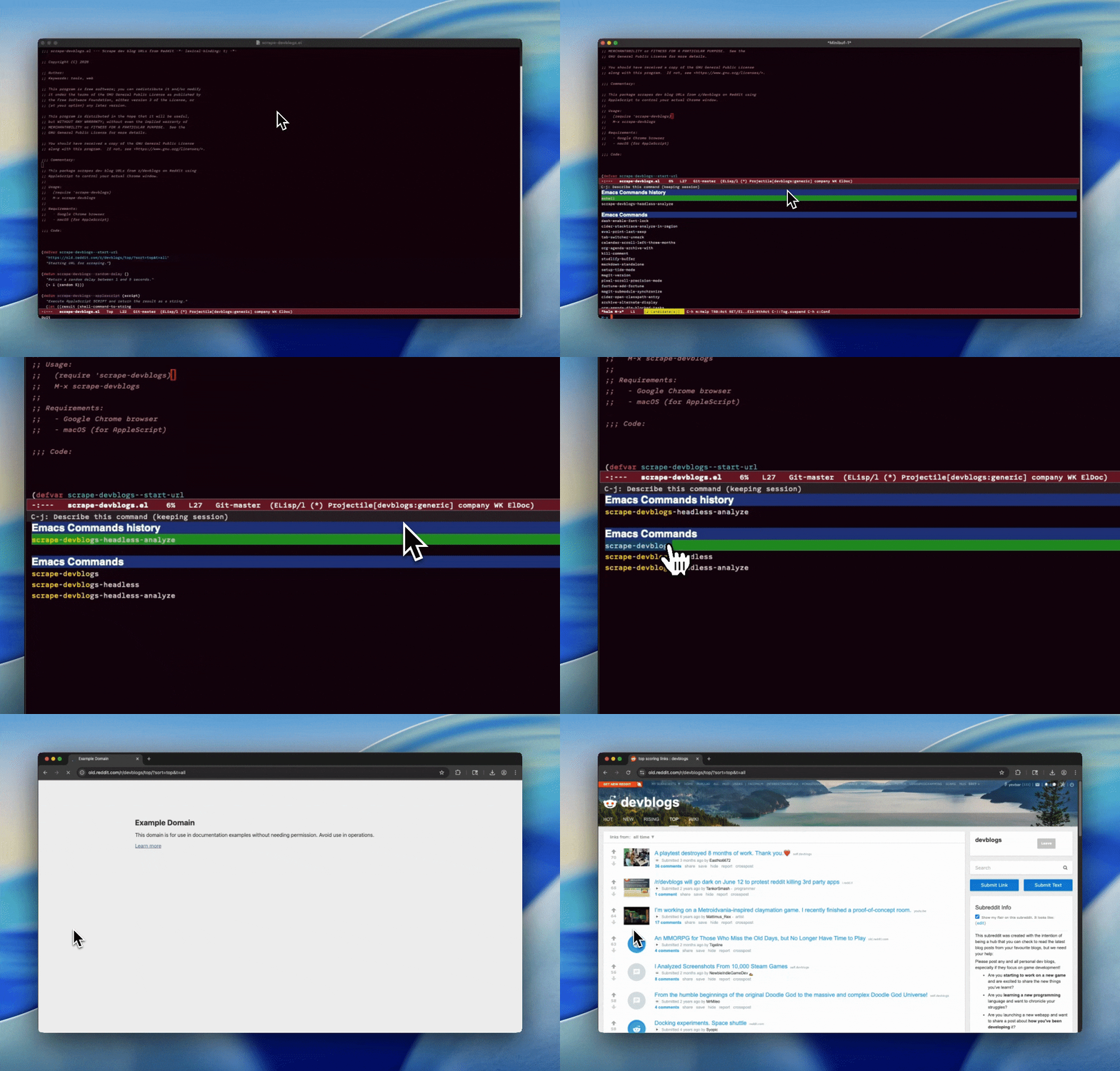
The method above will paginate through all of the top posts from that subreddit and then write a list of the scraped URLs to a text file which can be used in the next step.
Browsers… in the cloud!
Next, I’ll call a second method where emacs spawns multiple headless browsers to fetch the content for each of those blogs. The advantage to doing it this way is that I don’t have to sit and scan with my local browser sequentially through hundreds of individual URLs if I don’t care about them all returning content.
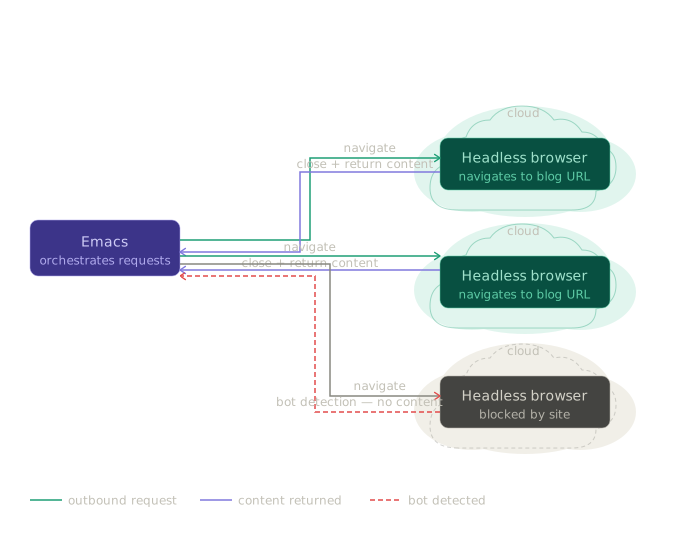
As added rationale, after clicking on a few of the submissions in the subreddit, there are some blog posts which are gone and may only be findable in the Wayback machine. Plus, it saves my RAM so I don’t see my computer freeze up from lots of browsers running in the background.
For hosting the headless browsers, I created in them in Vers VMs and I also put the general flow for headless browsers on the platform in this repository.
Key takeaways
After running the third method to analyze the scraped blogs, these were the takeaways I got suggested from Claude:
- Lead with vulnerability and honesty - Posts like #465 (parenting struggles) and #466 (game that made no money) perform well because they share authentic developer experiences, not just successes.
- Solve real problems with depth - The best technical posts (#402, #405, #461) don’t just explain what they built, but why it was challenging and how they solved complex problems other developers face.
- Combine technical content with narrative structure - Posts like #415 and #457 succeed by framing technical challenges as problem-solving stories rather than dry tutorials.
- Provide behind-the-scenes insights - Content that pulls back the curtain on development processes (like #405’s EVE Online infrastructure or #457’s procedural generation philosophy) consistently engages readers.
- Avoid complaint posts and minimal content - The worst-performing posts (#25, #46, #99) either complain without providing value or have essentially no content. Focus on what you learned or built, not what went wrong with external services.
If I were to do this over again, I’d choose a more noble choice than “the best blog post” as my research target but hopefully this gives you an idea of one way to leverage public content on the web!
If you’d like to check out or use the emacs package yourself, here’s the GitHub: https://github.com/hdresearch/devblogs